
Using Technology in the Classroom: A Teacher’s Honest Take

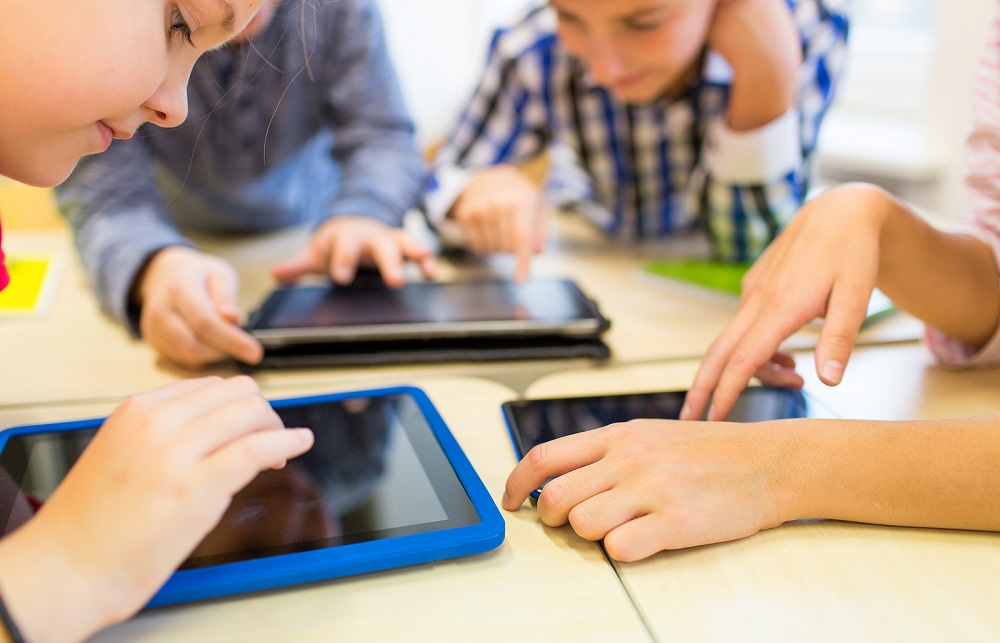
Using technology in the classroom works when the tool solves a problem you already had. School-issued Chromebooks and tablets, shared assignment platforms, and digital texts can shorten feedback cycles and widen access to reading material. The gains come from what the device replaces, not from the device itself.


I spent years keeping devices out of my classroom, and I was wrong about why. My worry was distraction. What I learned, once I started watching how other teachers ran their rooms, is that distraction is downstream of a better question: what is this tool doing that I couldn't do before? Some answers are good. A lot aren't. Here's how I changed my mind.
Why I Fought Classroom Technology for Years
I believed that if I let students open a laptop, they'd be playing games inside of four minutes. That belief wasn't paranoid. It was based on watching it happen.
What I got wrong was treating it as a yes-or-no question. The classrooms that worked weren't the ones with the most technology. They were the ones where the teacher had decided in advance what the device was for and closed off everything else. That's a planning problem, not a hardware problem, and it took visiting other people's rooms to see it.
What Changed My Mind: Two Classrooms I Visited
The Chromebook Room
Every student had a school-issued Chromebook. The teacher posted the day's assignment to Google Classroom, students opened it, worked, and shared it back for comments. What struck me was what wasn't happening. Nobody hunting for a pencil, nobody waiting on a handout, the teacher moving between students instead of managing paper.
The feedback loop was the real difference. A student could submit, get a comment, and revise inside the same period. I'd run that same loop on a two-day delay for my whole career and stopped noticing the delay was a choice.
The Response-Game Room
Students answered questions on a shared platform while results were projected at the front of the room. Once everyone submitted, the class could see the spread of answers and argue about which was right.
I'd done the same thing with hands in the air for twenty years. But hands in the air tell you what the confident students think. The screen told the teacher, in about eight seconds, how many students had actually understood what she'd just taught. That's information she'd otherwise have gotten on a quiz two days later, too late to reteach.
Where School Devices Actually Earn Their Place
After those visits, I stopped asking whether to allow technology and started asking what it would replace. Three things held up in my own room.
Draft feedback. I comment on an essay, return it, and see the revision without printing anything. Over a year, that's hundreds of pages saved, which matters when your building runs out of paper in March. But the printing isn't the point. The point is that a student can act on a comment while they still remember writing the sentence.
Access to texts. As a language arts teacher, I run literature circles, and I've always been limited by how many copies of a book I own. Four copies, five interested students, and somebody reads something they didn't pick. Digital copies can reduce that constraint when appropriate titles and licenses are available. I still prefer a physical book, and that preference isn't worth defending when it costs a student a book they wanted.
Looking things up. Independently finding and evaluating information is a skill students need explicit practice developing. Letting students research a definition or check a claim during class, with the expectation they'll tell me where they found it, does more for that skill than another worksheet. For a starting point on which tools are worth the setup time, our roundup of top technology apps for the classroom covers the categories.
The Access Problem More Devices Don't Solve
Handing out devices doesn't equalize anything by itself. A student with reliable internet at home gets a different assignment than a student without one, even when the assignment is identical. The one with no connection does the work in the twenty minutes before the bus, or doesn't do it. I've assigned things that quietly punished kids for their home situation and had no idea I was doing it.
The underlying access gap is documented. Pew Research Center reports that about a third of adults in households earning under $30,000 a year are smartphone dependent, meaning they own a smartphone but have no home broadband, compared with 4% of those in households earning $100,000 or more. Liz Kolb, an education professor at the University of Michigan, has drawn on that pattern to argue that for some students school may be the only place they learn to use a phone for something other than entertainment. That argument doesn't settle the phone question, but it's worth being able to answer.
The practical version for your own planning: before you assign anything needing a device outside the building, find out who has one and who has a connection. Ask directly, privately, and early.
What I Still Worry About
The distraction problem is real, and I never solved it; I only contained it. An open screen can put the lesson in competition with highly engaging digital distractions. In the classrooms I observed, successful device use was paired with expectations so specific they sounded fussy: device flat on the desk, closed when I'm talking. Fussy worked in those rooms.
The second thing is that the ground has moved since I first wrote about this, and it's moved hard against personal phones. Many states have now adopted statewide laws or policies addressing student cellphone use in K-12 schools, though they vary widely in scope. Some restrict phones for the whole school day, some only during instructional time, and some just require districts to adopt a policy without saying what it should contain. Exceptions are common but not uniform, and they differ by state: emergencies, students with an IEP or a documented medical need, and teacher-directed instructional use all appear in some statutes and not others. State-level restrictions have become much more common, reducing local discretion in many places.
So the part of my advice that still holds is the part about school-issued devices, because those are what your policy is built around. Check your own state law and your district's rules before planning anything involving a personal phone, because what applies in one district may not apply in the next.
The last worry is the quietest one. It's possible to run an impressive technology-rich classroom where not much learning happens. The tool makes the room look modern. It doesn't make the lesson good.
Frequently Asked Questions
Is technology in the classroom actually better than paper?
For some tasks, devices can offer advantages. Fast feedback on writing, formative checks on understanding, and access to texts you lack physical copies of are common examples. Paper may be preferable for some tasks or students, particularly sustained reading and note-taking. Outcomes depend on the task, the student, accessibility needs, and how the tool is used, so match the tool to the task rather than standardizing on one.
Can students still use phones in class for schoolwork?
It depends on your state and district, and it has changed recently for most teachers. Many states have adopted statewide restrictions or requirements on student cellphone use, but they differ substantially in what they cover and often leave implementation to districts. Some allow teacher-directed instructional use and some don't. Read your own state law and district policy rather than assuming any exception applies to you.
How do I keep students from getting distracted by their devices?
Set narrow, explicit rules about what's open and when, and enforce them from day one. In the classrooms I observed, successful device use was paired with specific expectations about when and how devices could be used. Decide before the lesson what the device is for, then close the rest.
What if my students don't have internet access at home?
Find out who they are before assigning anything that requires it. Then either keep device work inside the school day or build an offline path that isn't obviously the lesser version. An assignment assuming home connectivity grades students on their household, not their work.
I've resisted classroom technology for years. Where do I start?
Pick one problem you already have and one tool that addresses it. Faster feedback on drafts is the best first move: the benefit shows up immediately, and the setup is small. Get that working before adding anything else.
- Start from the problem - Technology earns a place in the room when it replaces something slow or scarce, not because the room should be modern.
- Faster feedback can be a major benefit - Commenting on a draft and seeing the revision in the same period changes what students can do with your feedback.
- Clear planning and device-use expectations can reduce distraction - The classrooms I observed had narrow, explicit rules about what's open and when, decided before the lesson started.
- Devices don't equalize access - A student without home internet gets a harder version of the same assignment, so find out who that is before you assign it.
- Personal phone policy has shifted - Many states have adopted statewide restrictions or requirements on student cellphone use, and the details vary, so check your state and district rules before planning around them.
Classroom technology tends to move faster than preparation coursework does. Teachers who want more formal preparation may pursue coursework in instructional technology, curriculum design, or related areas. The programs listed on this page include online and part-time formats built for people already teaching full time.
- What Is a Harkness Discussion? A Teacher’s Guide - April 19, 2018
- Using Technology in the Classroom: A Teacher’s Honest Take - May 9, 2017
- What Is an Anchor Text in Education? A Teacher’s Guide - November 4, 2016